Every modern business should have an optimised Google Business Profile (GBP) as part of their online presence because it allows them to show up on Google search results in local packs and on Google Maps.
Many people set up a Google Business Profile but don’t take the time to optimise it, which can give you an advantage against your competition in search engine result pages (SERP). Even taking the time to make sure all your business’ information is correct and up to date can be all it takes to improve your visibility.
In this guide we will discuss why you need a GBP, and all the features you can use to stand out in search results.
How to set up a Google Business Profile?
If you don’t currently have a Google Business Profile the first thing you will need to do is head to https://business.google.com/en-all/business-profile/ and once you hit start now you will need to go through the questions to fill out and create your GBP.
You will need to enter some information to get started before you’ll need to verify that you’re a real business, which can be done a few different ways but video verification is becoming more commonly required. Once verified, your business will be visible in local search packs, you will also be able to add more information about your business to optimise your GBP.
Don't have a GBP? Check out our guide on setting up a Google Business Profile.
Local Packs
When you search for something with a local search intent, Google will offer up a local pack. You will have seen one of these the last time you were looking for a place to eat, or maybe for a tradesman. It looks a bit like this…
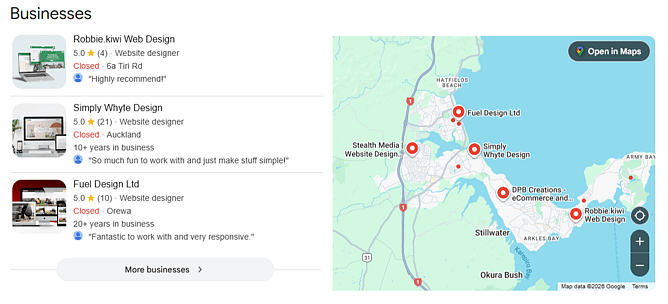
If you don’t have a GBP you will be ineligible to be shown, and even if you do have a GBP you’ll need to be one of the best matches for the search intent to be shown. Local pack results, like any search results page, will be affected by the user’s past search history, location, time of day etc. so don’t be discouraged if you try on your device but find it’s different to your friends or coworkers results.
When you have an optimised GBP showing up on local packs you’ll also take advantage of justifications. These are little snippets of information with reviews, products, services, and menu highlights depending on the type of business and/or search query.
Google Business Profile Essentials
Most parts of your business profile will stay the same or change infrequently over the lifetime of your business so you want to make sure that they are optimised to begin with. Having this information on your Google Business Profile (GBP) also helps Google to connect the dots between other places on the web where your business is mentioned to allow it to give the most relevant search results for a user.
Here are some of the essential elements of your GBP and how to optimise them.
Business Name
Simply use your full business name ESPECIALLY if it contains any industry keywords. Don't be tempted to shorten it or do any silly business, as it may harm your visibility on Google searches.
Address / Service Area
If your business has a physical location like a retail store, office or restaurant, you will want to include your address so that your customers can get directions to your business, and also so that you show up in those “near me” searches.
You can also add your service areas which may help you be found when customers are not nearby or if you are in a niche business that may have fewer results to show a searcher.
Mobile businesses like tradies, or delivery businesses may prefer to go with only showing their service area, this protects your privacy and shows potential customers where you are willing to travel. Although, beware that this option may limit your businesses visibility in “near me” searches.
Phone Number
Phone numbers are handy to include on your GBP so that people can make contact with you easily. Having a phone number can allow your customers to text and call your business giving them the flexibility to contact you how they prefer.
If you have WhatsApp for Business you can also include this on your GBP as an additional way customers can contact you, which is especially useful if the person prefers messaging over calling.
Website
Having a website connected to your business profile will allow customers to view your website in local packs and gives them peace of mind that this is the correct website for your business.
Business Description
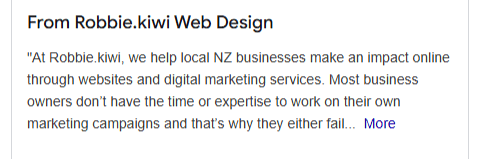
Including a description of your business is probably the most important yet least optimised section of any GBP. You will often find a short and rather generic description of a business in a GBP and that means this is your chance to stand out from the competition.
When writing a description to include on your GBP you’ll want to start by briefly introducing yourself. You should include your business name, location / service area, what you do and who you help.
At Robbie.kiwi, we help local NZ businesses make an impact online through websites and digital marketing services.
Next, try to strike a nerve in your clients, relay a challenge that they might be facing.
Most business owners don’t have the time or expertise to work on their marketing campaigns and that’s why they either fail miserably or live at the bottom of their to-do list indefinitely.
Now, it’s time for your solution to their problem.
That’s where we come in with our expert knowledge of web design, SEO, content creation and paid advertising.
Then include a brief history of your business, including major milestones.
Since 2024, we have helped local businesses get client leads through the use of digital marketing channels like their website, social media, and paid ads on Google and Meta.
And where possible, depending on your available word count, include social proof.
Through working with Robbie.kiwi, our clients have started “reaching the right audience”.
At the end of your description you should include a call to action to prompt your potential customer to take the next step, whatever that is for your business.
View our website today to see how we can help you succeed online.
Here are some questions to ask yourself when writing a description of your business:
Who is your target audience, and what do they want to know about your business?
What are your businesses unique selling points (USP)?
What action do you want your customers to take? E.g. “Get a Quote”, “Visit our Store” or “Shop Online”
What keywords do I want to target?
Category / Services
Including your category allows you to show up for keywords based around your business. You can have up to 10 categories but your primary one is what you will be categorised as in Google’s local search packs, and for this reason it is one of the most important aspects of your GBP.
If you are a business that changes seasonally is it considered best practice to update your primary service category based around the time of year.
Under each of your categories, you can have additional services like ‘Website Audits’ under the ‘Web Designer’ category. This allows you to be more specific about the types of services you offer, you can also add pricing and descriptions to these specific services.
Social Media Links
If you are on any of the major social media platforms you can build customer trust by sharing your social profiles on GBP. These will appear at the bottom of your GBP in search results.
Optimising Photos & Videos on your Google Business Profile
A picture paints a thousand words so including images and videos of your business can help build trust with your potential customers especially for businesses in retail or hospitality.
Logo
Although not often shown, including a logo on your GBP can help with business recognition.
If you’re a local business, the potential customer may have seen your logo before and this can help with trust.
Cover Photo
Along with a logo you can include a cover photo. Your cover photo is automatically set as your listing’s preferred photo so it is very important that you include this.
A cover photo can be shown in many different aspect ratios and sizes so when choosing you want the subject in the top half and centre aligned. You also don’t want something that’s got too much detail so look for a simple photo that showcases your business to customers.
The recommended size for a cover photo is 1332 x 750 pixels.
Photos & Videos
You should also include general photos and short videos of your business, these can be photos of what you sell, your team, the office. Including photos and especially videos can increase engagement rate from potential customers.
Here are what Google recommends as a minimum:
3 exterior photos
3 interior photos
3 photos at work
3 team photos
Based on your industry you should also include as a minimum:
Restaurants / Cafes etc.
3 photos of food or drink served
Hotels / Motels
1 of each common area (e.g. spa, gym or breakfast room)
3 of your most popular guest rooms
Retail
3 product photos
For these photos to look their best they should be 720 x 720 pixels and between 10 KB and 5 MB in size.
User-generated Images
When someone has visited your business Google may request a review from them, they may even add a photo or two. These photos will be added to your businesses list of photos.
This can be fantastic in many cases, and for many businesses you should actually encourage this by providing opportunities for people to get great pictures whether that’s having a photo wall, taking their photos for them or asking them to add a photo to their review.
On the odd occasion someone can upload a seemingly unrelated image when prompted so you’ll want to keep an eye out for this. If you come across one of these you will want to select the photo and click “Report a problem” to flag it for Google to review.
Business Specific Google Business Profile Features
Certain businesses can benefit from utilising extra features of the GBP
Products
For retail business including products is essential to driving customer interactions especially for businesses that don’t use Google Merchant Centre.
You can add products from your GBP manager. Simple click ‘Edit products’ then ‘Add product’ or click on an existing product to edit it.
You can add a product with a name, custom category, and photo. Optionally you can include a price, description and product landing page URL to further optimise.
Once you have added a product your customers will now see this on your GBP below the basic information.
Bookings / Appointments
Depending on your business category this option may be named bookings or appointments.
But in either case, for many businesses, Bookings / Appointments are a vital part of getting customers through the door. When you include a booking link on your GBP you can convert potential customers into paying customers even quicker. No need for them to go to your website and find the booking link, they can get there straight from your GBP.
Bookings / Appointments links can be added from your GBP manager. Click ‘Bookings’ or ‘Appointments’ and add a link to your booking page.
Ongoing Google Business Profile Optimisations
Reviews
You’ve probably been requested to leave a review for a business at some point and it is for good reason. Reviews let people know that your business is trustworthy and worth using.
If people have to choose between two businesses where everything else seems about the same then you can bet your bottom dollar they’ll pick the one with the better reviews. You’ll even see when two places have the same star rating that the one with 100 reviews will lose out to the one with 500.
Reviews are also used in local pack justifications which help you stand out.
So make sure to ask for reviews for your business, and the next important step once you’ve received the reviews is to respond to them. According to a study by Bright Local, 89% of consumers are ‘highly’ or ‘fairly’ likely to use a business that responds to all of its online reviews (negative or positive). It only takes a moment to say thanks, but if you’ve got time write a genuine response and try include some of your target keywords (location, product / service etc.).
Q&A
Sometimes customers have questions about your business like “Do you offer gluten-free options?” or "Do you offer gift wrapping?" Whatever they may be, it is a great idea to answer these questions as someone else likely has the same question. It doesn’t take long to answer these and they may help to stop any headaches in the future.
Posts
If you have any updates about your business, a GBP post can be an effective way to let people know about it. These help you stand out from the crowd in local search packs as these may appear as justifications in local packs.
You can share three type of posts on GBP:
Updates
Offers
Events
Updates are great for sharing general information about the business like if there is going to be a service disruption or if you want to share a milestone. You can include a description, images/videos and add a CTA button.
Offers are perfect for sales or special promotions. You can add a title, description, start and end dates, images/videos, T&Cs, coupon codes, and a link to redeem the offer.
Event posts can be used for a variety of different things, such as grand opening, workshops, band performances or whatever type of event your business runs. You can add a title, description, start and end dates, images/videos, and add a CTA button.
You can write up to about 250 words (1500 characters) in a post description but this is not best practice, try to keep it closer to 80-100 words (500 characters) so you will get the best results no matter what context the post is shown.
As of late 2025, you can now schedule these posts for future publishing.